

Approov Integration with Apollo GraphQL in React Native: A Step-by-Step Mobile Security Guide
This comprehensive guide walks through the essential steps for integrating the Approov SDK to protect your Apollo GraphQL API running on a React Native application. This powerful approach leverages Approov’s protection at the network transport layer, making the integration independent of the specific GraphQL query shape. This is especially beneficial as it requires no special handling for advanced features like persisted queries and batching, treating them simply as standard HTTP requests.
Why Use Approov for Apollo GraphQL?
Approov's strength lies in its ability to operate at the network transport layer. This design ensures that your API is protected regardless of the complexity or format of your GraphQL queries. The integration is straightforward, securing your mobile API endpoints against a wide array of threats, including automation, scraping, and unauthorized client access.
Prerequisites for Approov Integration
Before beginning the integration, ensure you have the following:
- The Approov service installed and configured for your environment.
- Your unique Approov configuration string obtained from your onboarding process.
Step-by-Step Integration Guide
The following steps outline the required changes to your React Native application's setup to secure your GraphQL API. I've created an example app to show the necessary steps.
Step 1: Import the Approov Libraries
Begin by importing the necessary components from the @approov/approov-service-react-native package into your application.
import {
	ApproovProvider,
	ApproovService,
} from'@approov/approov-service-react-native';
Step 2: Define Configuration Constants
Next, ensure you have a file for your configuration constants, including your unique Approov configuration string and the GraphQL endpoint URL.
src/constants.js (Example Content)
// Approov config string from your Approov onboarding email.
export const APPROOV_CONFIG = '#cb-adriant#reDactEdreDactEdreDactEdreDactEdreDactEd#>';
export const GRAPHQL_ENDPOINT = 'https://rickandmortyapi.com/graphql';
Step 3: Configure Approov and URL Exclusions
Define an approovSetup function to initialize the Approov service. A critical part of this step is defining which URLs are excluded from Approov protection. This allows you to protect only the necessary API endpoints (e.g., /graphql) while ignoring others (e.g., image paths).
The example below uses a regular expression to exclude all paths under https://rickandmortyapi.com/ except for /graphql.
// Approov runs in the native networking layer: it attests the app and then
// injects an Approov token (and optional secret substitutions) into requests
// for protected domains/paths. We configure it before the SDK initializes.
const approovSetup = () => {
  if (!ApproovService || typeof ApproovService.prefetch !== 'function') {
    console.warn(
      'ApproovService is unavailable. Rebuild the dev client to enable Approov.'
    );
    return;
  }

  // Only protect the GraphQL endpoint; exclude image and other paths.
  ApproovService.addExclusionURLRegex('^https://rickandmortyapi\\\\.com/(?!graphql)');

  // Prefetch reduces latency for the first protected call.
  ApproovService.prefetch();
};
Step 4: Wrap Your Application with ApproovProvider
Finally, wrap your main application component with the ApproovProvider. This ensures that the Approov service is fully initialized and configured before any network requests are made.
- You will pass the APPROOV_CONFIG string to the provider.
- You will call the approovSetup function before the provider is rendered.
(Conceptually, you would wrap your root component with <ApproovProvider config={APPROOV_CONFIG}> and ensure approovSetup() runs during application initialization.)
CLI and Debugging Tips
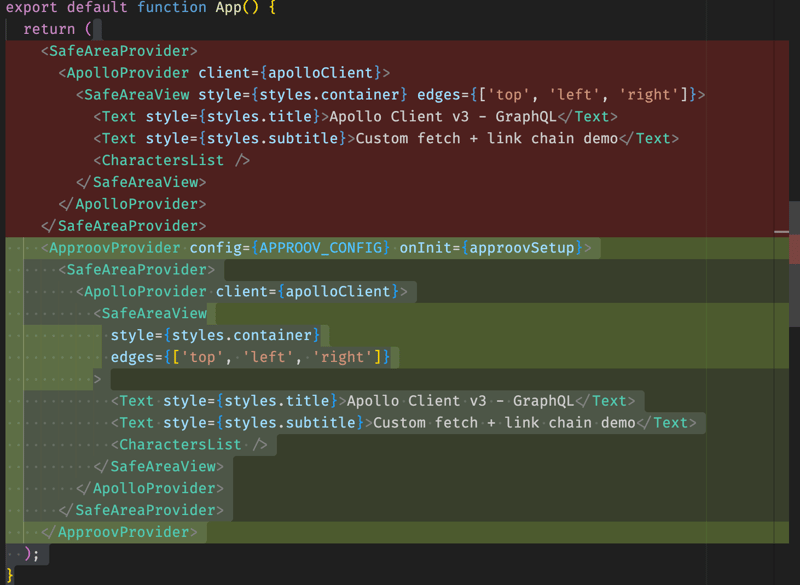
After implementing the code changes, it is highly recommended to verify that Approov is protecting your intended domain and that the tokens are being issued correctly.
Protecting the API Domain
If your console shows a status of UNKNOWN_URL for your API domain:
[simplereactnative.debug.dylib] ApproovService INFO:
token for rickandmortyapi.com: {"status":"unknown URL"}
This means the domain has not been added to your list of protected domains in the Approov CLI. You must run the following command (replacing the example domain with your actual protected domain):
approov api -add rickandmortyapi.com
Inspecting Requests
To ensure the token is correctly attached to your backend requests, inspect the network traffic. For local debugging, the Approov CLI can also be used to check the token:
approov token -check
By following these four steps, your Apollo GraphQL API endpoint will be protected by Approov's mobile security measures at the network transport layer.