
So it is reasonable for a mobile team to ask: if we are already using Firebase, do we need an additional mobile API security solution?
The honest answer is: it depends on what you are trying to protect.
Firebase provides important security controls, especially for Firebase-native services. But Firebase security and mobile API security are not the same thing. If your application uses custom APIs, third-party APIs, sensitive business logic, valuable data, or has a realistic risk of reverse engineering, automation, token replay, fake app traffic, or runtime tampering, you may still need an additional mobile API protection layer.
The key is understanding where Firebase protection starts, where it ends, and what risks remain.
What Firebase Already Does Well
Firebase includes several important security features that every Firebase-based application should use.
Firebase Security Rules help protect data stored in Cloud Firestore, Realtime Database, and Cloud Storage. Google describes Security Rules as a way to define what data users can access, with rules that sit between your data and potentially malicious users. These rules can be broad or highly granular depending on the app’s data model and access requirements.
For Cloud Firestore, Firebase Security Rules provide access control and data validation, and Firebase recommends using Firebase Authentication alongside Security Rules to build user-based and role-based access systems.
Firebase also provides Firebase App Check, which helps ensure that only your apps can access supported backend services. Firebase’s own security checklist recommends enabling App Check for every service that supports it as part of avoiding abusive traffic.
This matters. App Check is not just a checkbox feature. For many Firebase-native applications, it can reduce abuse by helping distinguish legitimate app traffic from traffic that does not originate from the registered app.
Firebase’s security checklist also makes an important point about Firebase API keys: they are not secrets. Firebase API keys identify the Firebase project and app, while authorization is handled through Google Cloud IAM, Firebase Security Rules, and Firebase App Check.
In other words, a Firebase app should not rely on hiding Firebase configuration values. It should rely on correctly configured authentication, authorization, rules, monitoring, quotas, and App Check enforcement.
That is a strong foundation. But it is not the whole mobile API security story.
The Important Distinction: Firebase Resources vs. Mobile API Access
The most important question is not “Is Firebase secure?”
The better question is:
What are you asking Firebase to protect?
If your app is simple, low-risk, and uses only Firebase-native services, then Firebase Security Rules, Firebase Authentication, App Check, monitoring, and quota controls may be enough for your risk profile.
But many mobile apps are not Firebase-only.
They may also call:
- Custom backend APIs
- Cloud Run, Kubernetes, AWS, Azure, or on-premise services
- Payment, identity, mapping, travel, booking, media, retail, gaming, or healthcare APIs
- Third-party APIs protected by static API keys
- Internal business logic that should only be accessible from genuine mobile apps
Once the app calls services beyond Firebase-native resources, the security model changes.
Firebase App Check can be used with custom backend resources, but it is not automatic. Firebase’s documentation says that to protect a custom backend, the app client must be modified to send an App Check token with each request, and the backend must be modified to require a valid App Check token with every request.
That is useful, but it also means the backend team must explicitly implement and enforce that verification. If only some APIs require the token, or if verification is added inconsistently, there may still be exposed endpoints.
Firebase also states that successful App Check verification indicates that the token originated from an app belonging to the Firebase project. That is an important signal, but it should not be confused with full protection against every form of mobile app abuse, runtime manipulation, reverse engineering, or API misuse.
Where Firebase May Be Enough
Firebase may be enough when the application has a relatively simple security profile.
For example, Firebase-native controls may be sufficient if:
- The app stores its sensitive data only in Firestore, Realtime Database, or Cloud Storage.
- Firebase Security Rules are carefully designed, tested, and kept in sync with the data model.
- Firebase Authentication is used appropriately.
- App Check is enabled and enforced, not just monitored.
- The app has limited custom backend functionality.
- The data is low risk or low value to attackers.
- The team is mainly trying to prevent casual abuse rather than targeted attacks.
For this type of app, adding a separate mobile API security layer may feel unnecessary, especially if the team has a low-risk use case and limited security resources.
But that is not the same as saying Firebase is a complete replacement for mobile API protection.
Where Additional Mobile API Security Still Matters
Mobile apps are different from traditional web applications because the client runs in an environment the developer does not control.
Attackers can download the app, inspect it, modify it, instrument it, run it on emulators, intercept traffic, extract secrets, replay tokens, automate requests, and build scripts that impersonate legitimate app behavior.
Firebase helps with part of this problem. But many mobile security risks sit outside the database authorization layer.
An additional mobile API security layer becomes important when you need stronger answers to questions like:
- Is this request coming from a genuine, untampered version of my mobile app?
- Is the app running in a trustworthy runtime environment?
- Has the app been modified, repackaged, hooked, or instrumented?
- Is the request coming from a script, bot, emulator, or fake client?
- Could an attacker replay a captured token?
- Are static API keys or secrets being extracted from the app?
- Are API calls being intercepted or manipulated through a Man-in-the-Middle attack?
- Do we need to protect APIs that are not Firebase services?
This is where the distinction between backend authorization and mobile runtime trust becomes critical.
Firebase Security Rules answer questions such as: “Is this authenticated user allowed to read or write this Firebase resource?”
Mobile API security answers a different question: “Should this backend trust the mobile client making the request in the first place?”
Both questions matter.
App Check Is Useful, But Configuration and Threat Model MatterFirebase App Check is one of the most relevant Firebase features in this discussion. It is designed to help ensure requests come from an authentic app, and Firebase itself says App Check helps mitigate fraud and secure access to backend resources, including both Firebase resources and a developer’s own backend.
However, teams still need to understand how App Check is configured and what security assumptions it supports.
For Android apps using the Play Integrity provider, Firebase notes that App Check supports apps published on Google Play, outside Google Play, or both. It also provides advanced settings for app recognition, licensing, and device integrity.
Those settings matter. Firebase’s documentation states that, by default, App Check requires the PLAY_RECOGNIZED app recognition label, but does not require the LICENSED label and does not explicitly check the device integrity verdict.
That does not mean App Check is weak. It means teams need to decide whether the default settings match their actual risk model.
For example, an app worried about casual abuse may be comfortable with default App Check enforcement. An app dealing with banking, healthcare, ticketing, gaming, retail inventory, loyalty accounts, account takeover, scraping, or paid API access may need a stronger security posture.
Token lifetime is another area where tradeoffs matter. Firebase allows App Check token TTLs from 30 minutes to 7 days. Shorter TTLs reduce the window in which a leaked or intercepted token can be abused, but they also increase attestation frequency, which can affect latency, quota usage, and cost.
That is a classic security tradeoff: stronger protection often requires more operational attention.
What Approov Adds
Approov is designed for the broader mobile API trust problem.
Approov Mobile Security is a runtime application self-protection technology that enables software attestation for mobile applications running on iOS and Android. Approov’s stated purpose is to help ensure that an API request comes from a genuine, untampered mobile app instance, rather than a fraudulent transaction, malicious script, or bot.
Approov also supports a networking interceptor model that can automatically add an Approov token or secured API key to required API requests, while managing attestation refresh in the background.
This matters when security needs to extend beyond Firebase resources. Approov can be used to protect custom APIs, third-party API access, and backend services where the organization wants an independent signal that the mobile client is genuine and operating in a trusted state.
Approov also provides dynamic certificate pinning, which helps ensure the app only communicates with trusted servers and can update pins dynamically without requiring a new app release.
For teams concerned about static API keys or secrets embedded in mobile apps, Approov’s runtime secrets approach is designed to deliver secrets only to genuine, unmodified app instances that pass attestation, reducing the risk that secrets are extracted through static analysis or runtime attacks.
In practical terms, Firebase helps protect access to Firebase resources. Approov helps protect API access from the mobile app outward, including APIs and services outside Firebase.
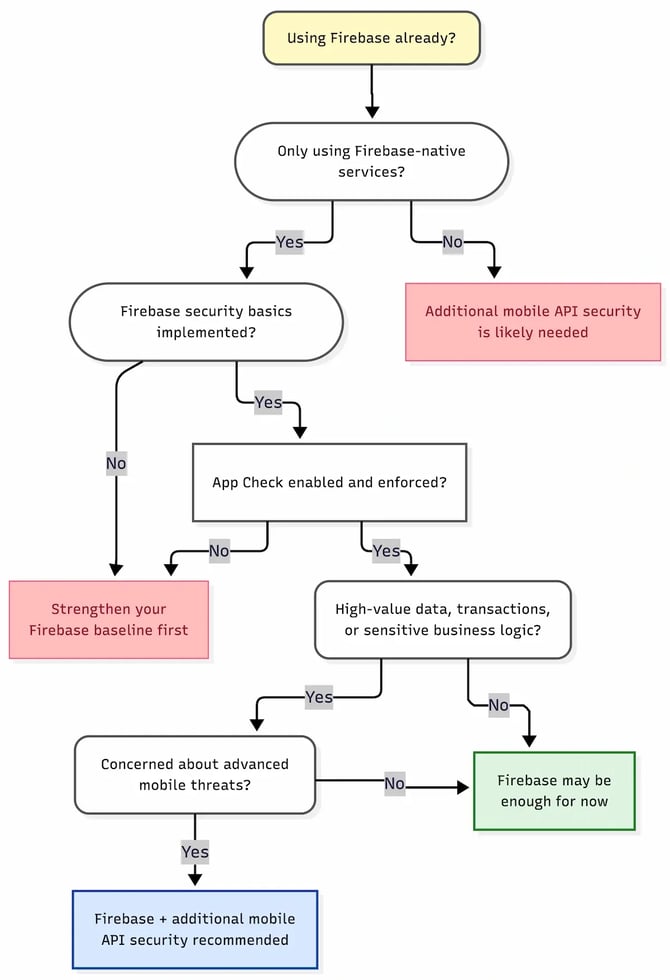
A Simple Decision Framework
A good way to think about this is:
Firebase may be enough if:
- Your app is Firebase-native.
- Your sensitive data is protected by well-tested Security Rules.
- App Check is enabled and enforced.
- You do not rely heavily on custom APIs.
- Your threat model is mostly casual abuse prevention.
- You do not need deeper runtime integrity checks.
You should consider additional mobile API security if:
- Your app calls custom backend APIs.
- You need to protect third-party API keys or secrets.
- You are worried about reverse engineering, scripting, or API automation.
- You need to distinguish genuine app traffic from fake clients.
- You need protection against runtime instrumentation, repackaged apps, emulators, or MitM attacks.
- Your APIs expose valuable data, transactions, inventory, pricing, account access, or business logic.
- Your security team needs central policy control beyond Firebase configuration.
The decision is not “Firebase or Approov.”
The better model is: Firebase secures Firebase resources. Approov secures mobile API trust.
For many organizations, those layers are complementary.
The Bottom Line
Firebase provides strong security tools, and any team using Firebase should take full advantage of them. Security Rules, Authentication, App Check, monitoring, quotas, and defensive Cloud Functions configuration are all valuable parts of a secure mobile architecture.
But Firebase does not automatically remove the need for mobile API security.
If your application only uses Firebase-native services and has a relatively simple risk profile, Firebase’s built-in controls may be enough. But if your app talks to custom APIs, exposes valuable business data, depends on third-party API keys, or faces realistic threats from reverse engineering, automation, token replay, fake apps, or runtime manipulation, then additional mobile API protection can still be necessary.
The real question is not whether Firebase is secure.
The real question is whether Firebase alone protects everything your mobile app exposes.
For many modern mobile applications, the answer is no. Firebase is an important part of the stack, but it is not the entire mobile API security layer.
That is where Approov fits: helping backend services decide whether a request should be trusted because it comes from a genuine, untampered mobile app running in an acceptable environment.
If you are already using Firebase, the next step is not to replace it. The next step is to map your Firebase and non-Firebase APIs, identify where sensitive data and business logic are exposed, and decide where mobile runtime trust needs to be enforced.